Image Sizes in the JobShop: Why There Are No Fixed Guidelines
We regularly get asked: "What image size do I need for Module X?" The short answer: there's no universal pixel size – because the JobShop is built with responsive design. Here's why that's the case, what it means for you, and how the focal point still gives you full control over your images.
What does "responsive design" mean?
Responsive design means your JobShop automatically adapts to the screen size and device of your candidates – whether that's a desktop monitor, tablet, or smartphone. Layouts, text sizes, and images are all scaled and cropped dynamically, so your page looks great on every device.
Why we chose this approach
On every device – from large monitors to smartphones
No need to upload multiple versions for different devices
New display sizes are automatically covered
Why there are no fixed image dimensions
Because your image automatically adapts to different screen sizes and aspect ratios, there's no single "correct" pixel size per module. Depending on the device, a slightly different section of your image will be visible – that's not a bug, it's the whole point of responsive design.
How you stay in control: the focal point
To let you decide which part of your image should always stay visible, we've introduced the focal point. For every image, you can define where it should be anchored within its frame.
Here's how:
- Select an image
- Click "Select focal point"
- Adjust the focal point on the image to your liking and apply the changes
- Publish the changes
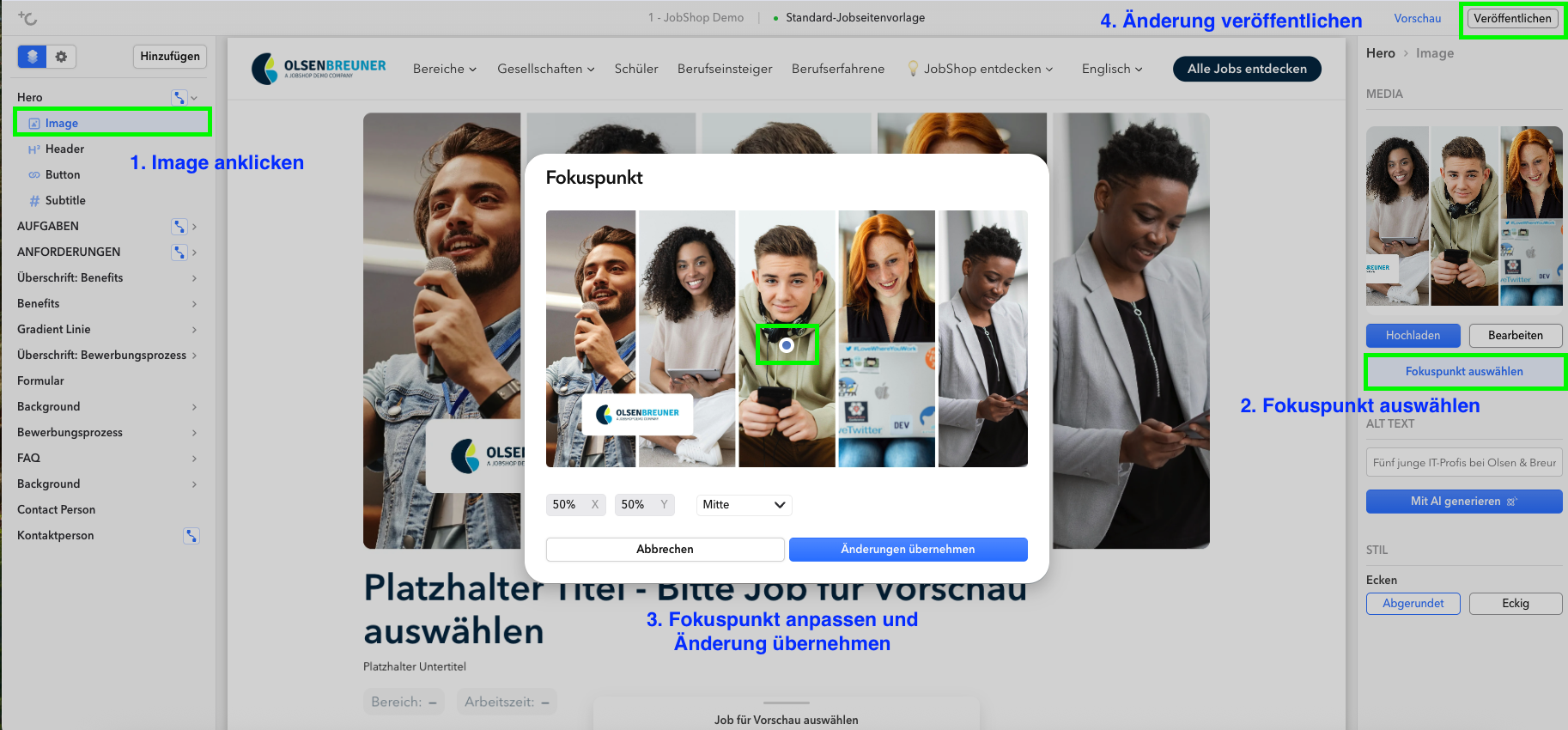
In the selection window, you'll see the image preview, the current coordinates (default: 50/50), and a dropdown with preset positions (e.g. top left, center, bottom right). Choose a preset, or click directly on the spot in the image you want.
Tips for the perfect photo
To make sure your image looks great in every module and on every device, it's worth thinking about the later crop already during the photo shoot. You'll find concrete tips here: Photo shoot tips for your JobShop
Last updated: August 2026 ✦ Language: English ✦ Audience: talentsconnect customers
Was this article helpful?
That’s Great!
Thank you for your feedback
Sorry! We couldn't be helpful
Thank you for your feedback
Feedback sent
We appreciate your effort and will try to fix the article