Image Sizes in the JobShop: Why There Are No Fixed Specifications
We regularly receive the question: "What image size do I need for module X?" The short answer: there is no universal pixel size – because the JobShop is designed responsively. We'll explain why that is, what it means for you, and how you can still maintain full control over your images using the focus point.
What does "responsive design" mean?
Responsive design means that your JobShop automatically adapts to the screen size and device of your candidates – whether it's a desktop monitor, tablet, or smartphone. Layouts, text sizes, and images are dynamically scaled and cropped so that your page looks its best on every device.
Why we decided on this approach
On every device – from large monitors to smartphones
No need to upload multiple versions for different devices
New display sizes are automatically covered
Why there are no fixed image dimensions
Because your image automatically adapts to different screen sizes and aspect ratios, there is no single "correct" pixel size per module. Depending on the device, a slightly different crop of your image will always be visible – this is not a bug, but the core of responsive design.
What we can still recommend
Even though there are no fixed pixel specifications, we do have reference values for two image types that you can use as a guide.
Contact person photo
- Aspect ratio: 3:4 in portrait format, so nothing important gets cropped. The face should be centered with a little space above the head.
- Resolution: Ideal is 900 × 1200 px. The minimum is 600 × 800 px – below this, the image will appear blurry on smartphones and Retina displays. More than 1200 × 1600 px offers no visible benefit, but only increases the file size.
- Format: JPEG (quality 80–85) or WebP. PNG only if the photo requires transparency. Avoid GIF, SVG, screenshots, or images upscaled from small files.
- Color space and file size: sRGB, ideally under 300 KB.
Company logo (displayed in the job list on the search and filter page)
- Formats: JPG, PNG, WEBP, and SVG are supported. A specific aspect ratio is not required.
- Image URL: The URL of the image must be publicly accessible.
- Visual recommendations: Use consistent coloring throughout (light on dark or vice versa, but no mixing), similar dimensions, and preferably a transparent background. Avoid small text and negative space.
How to stay in control: the focus point
To let you decide which area of your image should always remain visible, there is the focus point. For each image, you can specify where it should be anchored within its frame.
Follow these steps:
- Select the image
- Click "Select focus point"
- Adjust the focus point on the image according to your preferences and apply the changes
- Publish changes
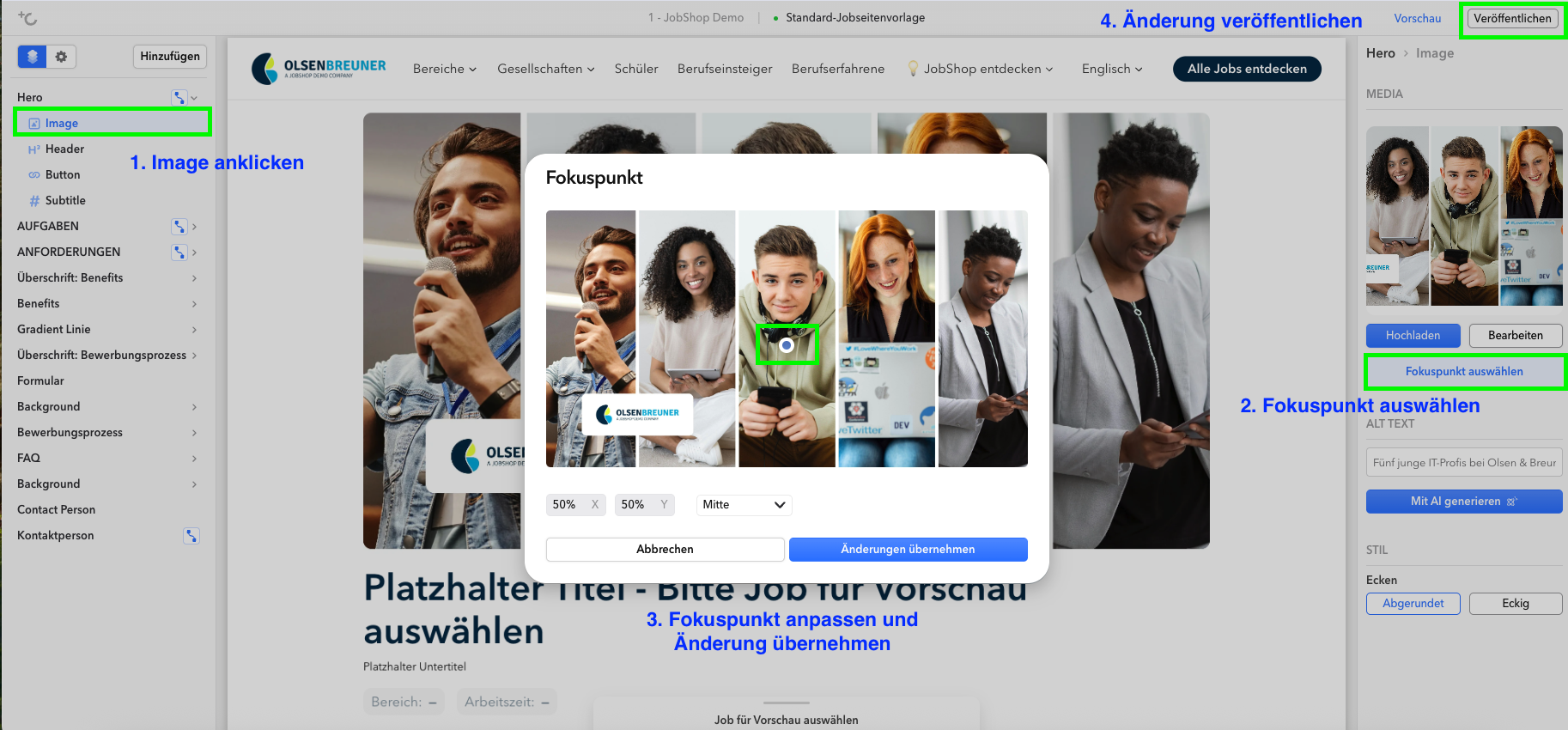
In the selection window, you can see the image preview, the current coordinates (default: 50/50), and a dropdown with predefined positions (e.g. Top Left, Center, Bottom Right). Choose a preset, or click directly on the desired spot in the image.
Tips for the perfect photo
To ensure your image looks great in every module and on every device, it's worth keeping cropping in mind right from the photo shoot itself. You can find specific tips here: Photo shoot tips for a JobShop
As of: August 2026 ✦ Language: English ✦ Target audience: talentsconnect customers
Was this article helpful?
That’s Great!
Thank you for your feedback
Sorry! We couldn't be helpful
Thank you for your feedback
Feedback sent
We appreciate your effort and will try to fix the article