Overview
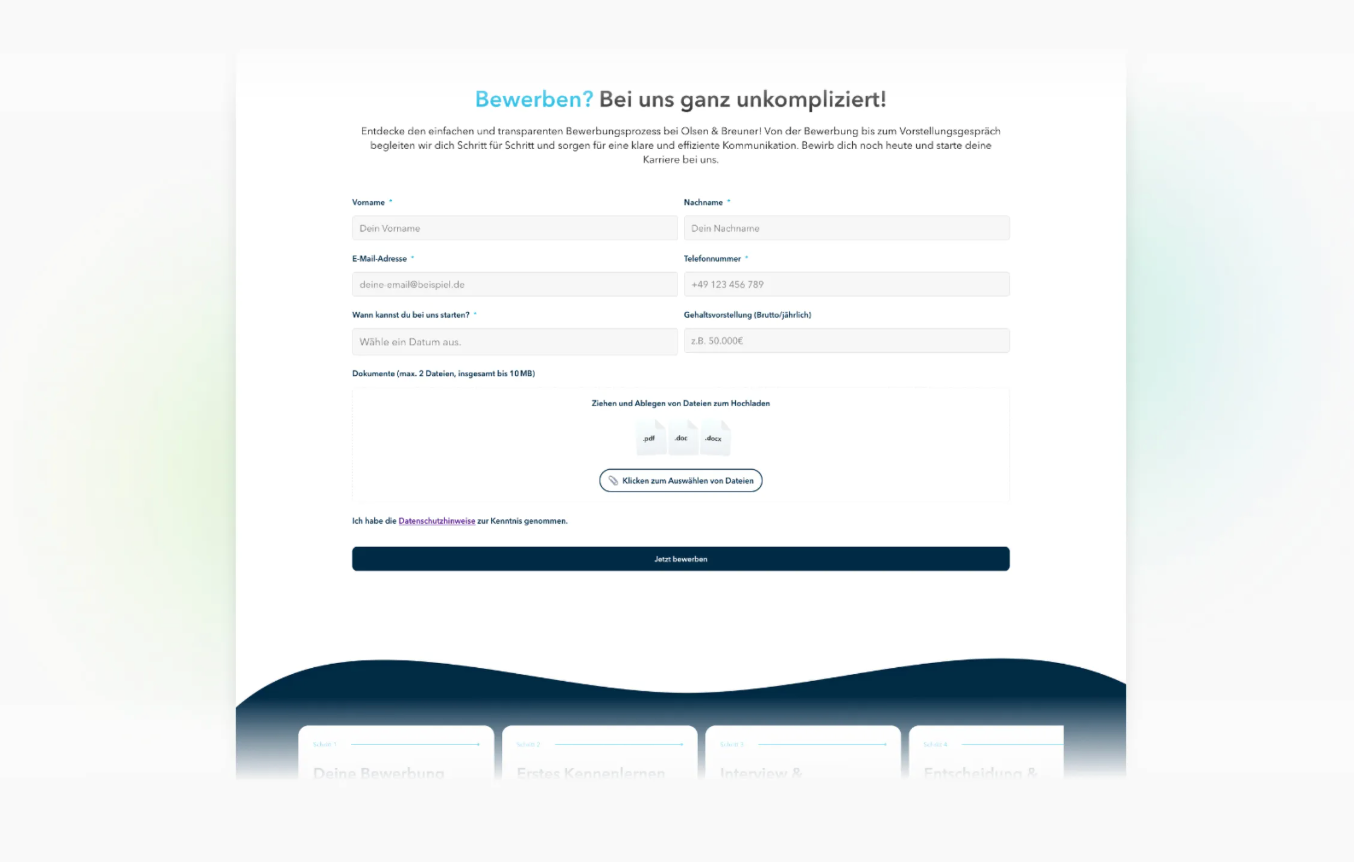
The new Fast Application is a modernized quick application form that is fully integrated into the job detail page. With high flexibility, a clear structure, and mobile optimization, it is designed to noticeably increase the conversion rate. Companies can use it to guide applicants through the application process faster, with fewer barriers, and in a more targeted way.
Note: In the initial rollout of the new job detail pages (early 2026), the existing forms will be carried over in terms of content and implemented by us in the new system accordingly.
What is the Fast Application?
The Fast Application is a freely configurable form module that enables candidates to apply for a position in just a few steps – directly on the job detail page, without unnecessary redirects or page changes.
Key features:
- directly integrated into the job detail page
- flexibly configurable with different input fields
- mobile-optimized for maximum conversion
- freely positionable in any job page template
- ideal for high-volume or hard-to-fill positions
Benefits of the new Fast Application
Higher conversion
By eliminating complicated steps, long forms, or external redirects, the application process is significantly simplified. Candidates can apply faster and with fewer barriers.
Fully integrated into the job detail page
The Fast Application is not an add-on module outside the layout, but a native element of the new job pages.
This ensures:
- seamless transition for users
- consistent look & feel
- greater trust and fewer drop-offs
Freely and flexibly customizable
You can flexibly use different input fields:
- Name
- Phone
- Resume/CV upload
- Motivation fields
- Qualification queries
- Salary expectation query
- GDPR confirmations
- etc.
This way, the form adapts to the type of position and to your applicant management process.
Individual placement
With the form module, the Fast Application can be placed anywhere in any job page template, for example:
- between benefits and responsibilities
- in the upper page area for high conversion
- at the bottom as a "final call-to-action"
This freedom enables different conversion strategies depending on the target group.
Structure and functionality
Modular form builder (internal)
The Fast Application consists of multiple flexibly combinable form blocks. These can be configured by talentsconnect and structured to match your process.
Validation and processing
- Inputs are dynamically validated
- Errors are displayed inline
- Data is passed directly to the Applicant Tracking System (ATS)
ATS integration
To ensure all data is transferred correctly, the form is initially set up by talentsconnect. All fields are coordinated so that they align precisely with the ATS field properties.
Important note on availability & setup
The new Fast Application is not yet available in the editor.
This means:
- You cannot yet configure or modify the form yourself.
- talentsconnect sets up the form in coordination with your ATS in advance for you.
Reason:
We are currently ensuring that all input fields communicate technically correctly with your Applicant Tracking System before we release self-management.
Best practices for the Fast Application
Less is more
Short forms → more applications. Avoid fields that are not absolutely necessary for the first step.
Positioning determines conversion
Proven placements:
- after the responsibilities or benefits section
- before the application process section
Different forms for different target groups
Examples:
- Blue Collar: very short, focus on contact fields
- Tech: resume/CV upload highly relevant
- Trainee/Graduate: two motivation questions are useful
Prioritize mobile experience
More than 70% of users apply via mobile. The Fast Application is optimized for this – use it to your advantage.
Summary
The new Fast Application brings significant improvements to the application process:
- higher conversion through fewer friction points
- flexible form as part of the job detail page
- freely configurable and positionable anywhere
- optimal mobile user experience
- secure and verified ATS integration
Until the full editor release, the module will be set up by talentsconnect to ensure error-free data transfer.
Was this article helpful?
That’s Great!
Thank you for your feedback
Sorry! We couldn't be helpful
Thank you for your feedback
Feedback sent
We appreciate your effort and will try to fix the article