Contact persons for jobs previously had to be maintained by TC Support in the backoffice – especially when the ATS didn't supply a photo, or when customers wanted to use the dynamic contact person module on the job detail page. In some cases, this even blocked the switch to the new job detail page. As of now, customers can manage their own contact persons – directly in Talentsconnect Home.
In short
| With ATS (Applicant Tracking System) | Without ATS | |
|---|---|---|
| Creating contact persons (Note: A one-time bulk import of existing contact persons from the old system into the new one is possible via TC Support) | Automatic – contact persons are created automatically when the job is imported (if they don't already exist) | Contact persons can be created directly in Talentsconnect Home |
| Assignment to the job | Automatic – contact persons are assigned when the job is imported, exactly as stored in the ATS. Manually created contact persons can be assigned via rules (see step 4) in addition to the ATS contact, without replacing it. | Contact person(s) can be selected when creating the job and/or adjusted afterwards via the job list. In addition, contact persons can now also be assigned automatically via rules. |
| Subsequent editing | Possible at any time (can be overwritten by values from the ATS on re-import – see the "Good to know" section below for details) | Possible at any time |
What's new?
1
New "Contact Persons" area in the navigation
Talentsconnect Home now has its own area for managing contact persons. Here you can see all the contact persons in your account at a glance – with profile picture, name, and email. Entries imported via the ATS are marked with an indicator. A search function and infinite scrolling make it easy to find your way around.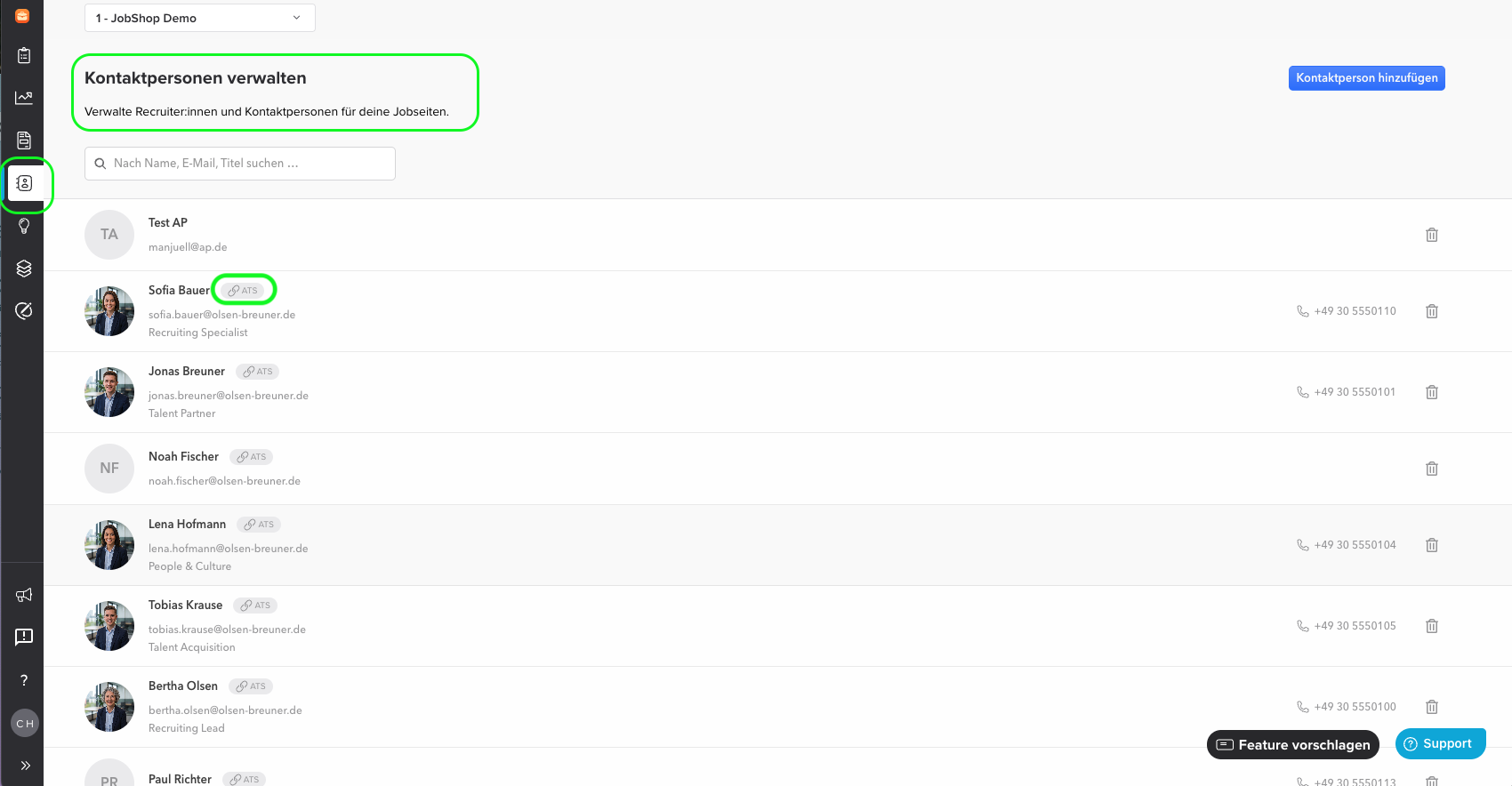
Talentsconnect Home now has its own area for managing contact persons. Here you can see all the contact persons in your account at a glance – with profile picture, name, and email. Entries imported via the ATS are marked with an indicator. A search function and infinite scrolling make it easy to find your way around.
2
Create and edit contact persons manually
You can create, edit, and delete contact persons directly – including uploading or removing a profile picture. Ideal if the ATS doesn't supply a picture or if you want to maintain contact persons independently of the ATS. Without an ATS connection, this is the standard way to create contact persons in the first place.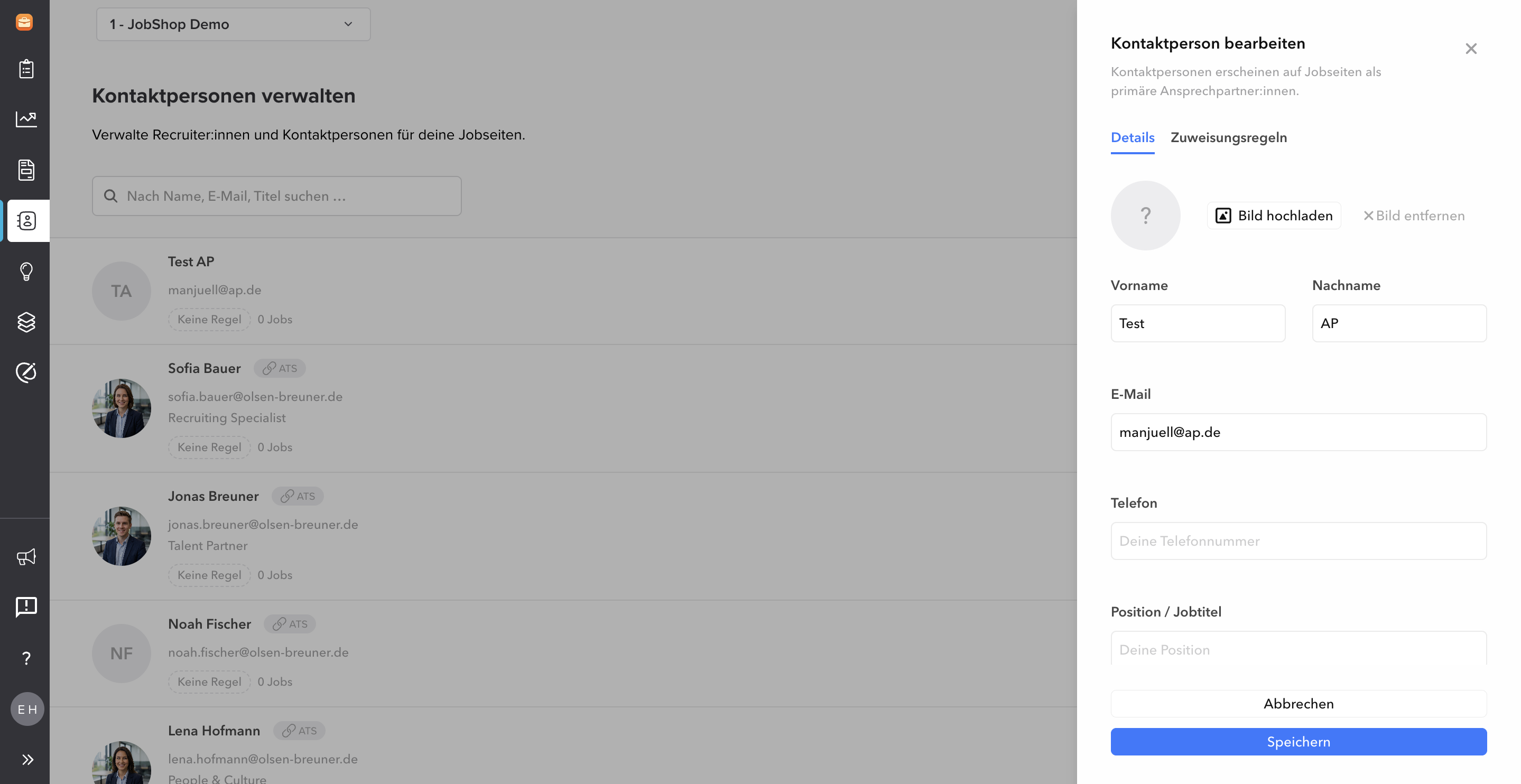
You can create, edit, and delete contact persons directly – including uploading or removing a profile picture. Ideal if the ATS doesn't supply a picture or if you want to maintain contact persons independently of the ATS. Without an ATS connection, this is the standard way to create contact persons in the first place.
3
Manual assignment to jobs
Using a dropdown, contact persons can be assigned to, changed on, or removed from jobs directly. Multiple contact persons can also be stored per job.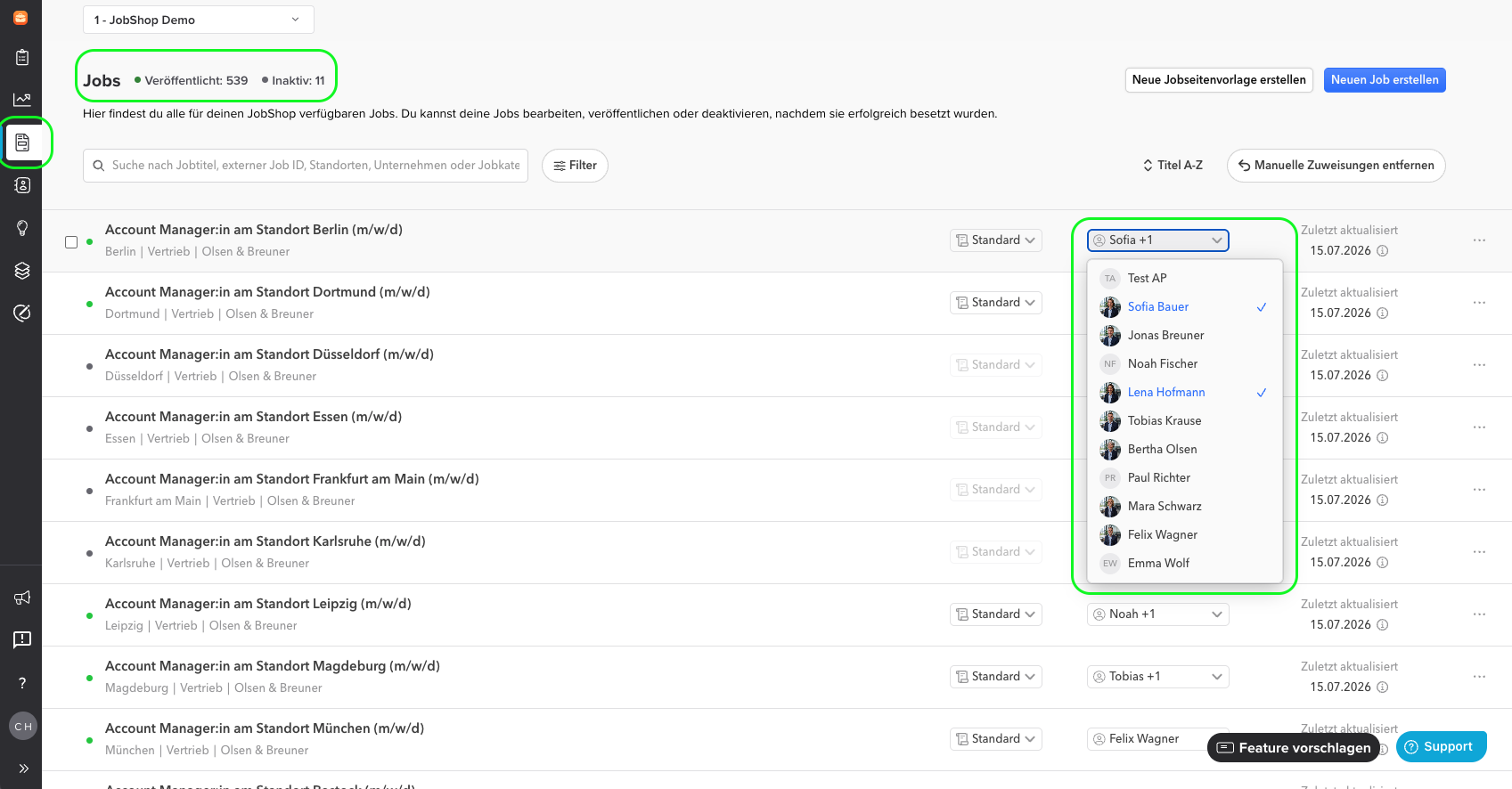
Using a dropdown, contact persons can be assigned to, changed on, or removed from jobs directly. Multiple contact persons can also be stored per job.
4
Rule-based assignment of contact persons
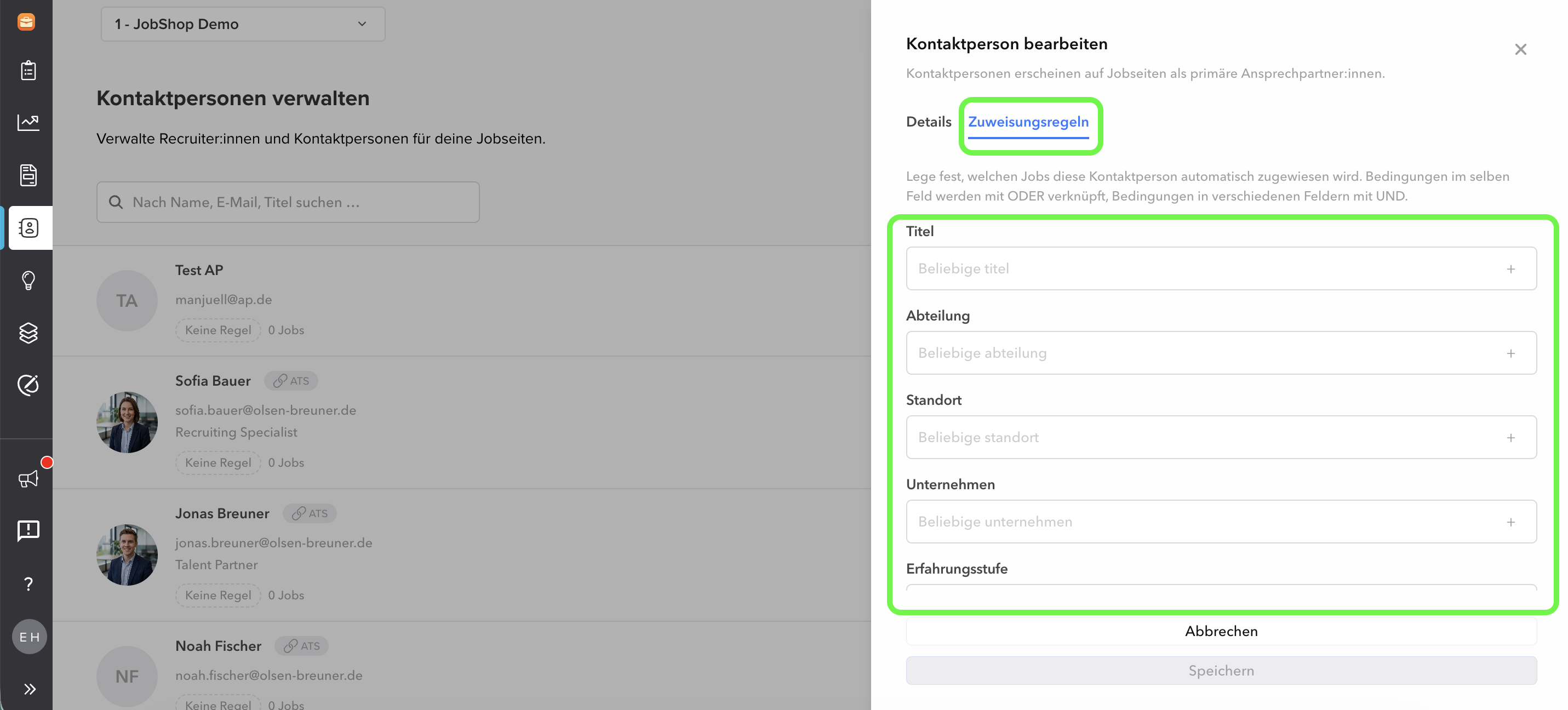
Contact persons can now also be assigned automatically instead of individually. In the new "Assignment Rules" tab for each contact person, conditions relating to title, department, location, company, etc. can be defined. Conditions within the same field are combined with OR, different fields with AND (similar to template assignment). Every matching rule assigns its contact person – a job can therefore receive multiple contact persons, and there is no prioritization. The contact person list shows the rule and the number of linked jobs for each person.
Contact persons can now also be assigned automatically instead of individually. In the new "Assignment Rules" tab for each contact person, conditions relating to title, department, location, company, etc. can be defined. Conditions within the same field are combined with OR, different fields with AND (similar to template assignment). Every matching rule assigns its contact person – a job can therefore receive multiple contact persons, and there is no prioritization. The contact person list shows the rule and the number of linked jobs for each person.
Good to know:
- Rules only remove links that they created themselves – manually created or ATS-imported contact persons remain untouched.
- As soon as the ATS supplies a contact that was previously assigned by a rule, the ATS feed takes over the lead – subsequent rule changes then no longer have any effect.
- If a job already has an ATS-imported contact and a rule also applies, both are assigned.
- For ATS-imported jobs, the ATS remains the leading source: rules can add additional contact persons but can never overwrite or remove the contact supplied by the ATS.
- When a rule is edited, it is also reapplied in the background to existing jobs, not just future ones.
- If no rule applies, the job doesn't get a contact person – there is no default fallback.
5
Bulk import for existing contact data
Customers who want to transfer a large number of contact persons from their old system can use the bulk import. This automatically creates all contact persons who were already assigned to a job via the ATS as manageable entries – without having to recreate them individually. This is done in coordination with talentsconnect support.
Customers who want to transfer a large number of contact persons from their old system can use the bulk import. This automatically creates all contact persons who were already assigned to a job via the ATS as manageable entries – without having to recreate them individually. This is done in coordination with talentsconnect support.
6
Automatic synchronization with the ATS
When jobs are imported via the ATS, the associated contact persons are automatically created and synchronized. Duplicates are detected and avoided using a combination of first name, last name, email, and phone number.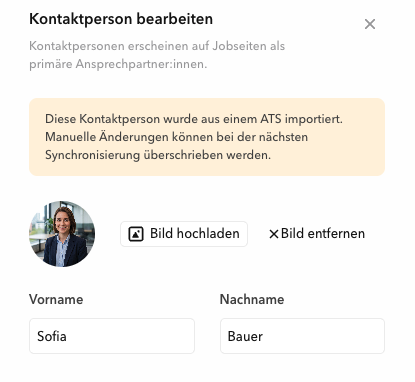
When jobs are imported via the ATS, the associated contact persons are automatically created and synchronized. Duplicates are detected and avoided using a combination of first name, last name, email, and phone number.
ℹ Good to know: On re-import, the ATS remains the leading data source: a non-empty value from the ATS overwrites manual changes. If the ATS supplies an empty value, however, the manual entry is retained – for example, a manually added profile picture for an imported contact without a picture.
The feature is automatically activated for all customers using the new job detail page. Customers who switch to the new job detail page in the future will also receive the feature automatically.
The feature is automatically activated for all customers using the new job detail page. Customers who switch to the new job detail page in the future will also receive the feature automatically.
Why this matters
| Benefit | Description |
|---|---|
| No more support detour | Create, edit, and assign contact persons yourself – without having to involve talentsconnect support. |
| Fewer migration hurdles | Missing pictures or contact data no longer block the switch to the new job detail page. |
| Flexible interaction with the ATS | Automatic import and sync, with the option to fill gaps manually. |
✔ Tip: Are you already using many contact persons via your ATS? Then the bulk import is worthwhile for making all existing contacts manageable in one step.
Video explanation
Last updated: August 2026 ✦ Language: English ✦ Audience: Customers / Talentsconnect Home users
Was this article helpful?
That’s Great!
Thank you for your feedback
Sorry! We couldn't be helpful
Thank you for your feedback
Feedback sent
We appreciate your effort and will try to fix the article