Overview
You put a lot of heart and soul into creating your career and campaign pages (Custom Pages), don't you? But what often gets overlooked is: the crucial look at performance.
- How successful are the individual pages, really?
- Which pages actually lead to applications in the end?
- And where are your visitors coming from?
Until now, these kinds of insights were only available for your jobs – but that's about to change:
With the new "Analytics per Page" tab in the talentsconnect Home, we now give you all the insights you need to measure the performance of your pages in the JobShop.
The new feature at a glance
In the TC Home under "Data & Analytics", you will now find the new tab "Analytics per Page".
Here you get an easily accessible overview of the performance of all your pages.
Your benefit

"I want an easy-to-use analytics tool that shows me at a glance how individual pages are performing and how users are interacting with them. For this I need clear metrics that make it obvious how the pages contribute to attracting & converting candidates – so I can make data-driven decisions and improve my results."
That's exactly what the Analytics per Page feature offers you!
Benefits at a glance:
- Clear insights: Identify what works – and what doesn't.
- Better understanding: Analyse the behaviour of your visitors.
- Full control: Manage your success with real data.
Positive effects for your company
- Better decisions based on real data
- More applications through optimised pages
- Full visibility into the performance of individual pages
- More successful campaign & career pages
- Less guesswork – more control in recruiting
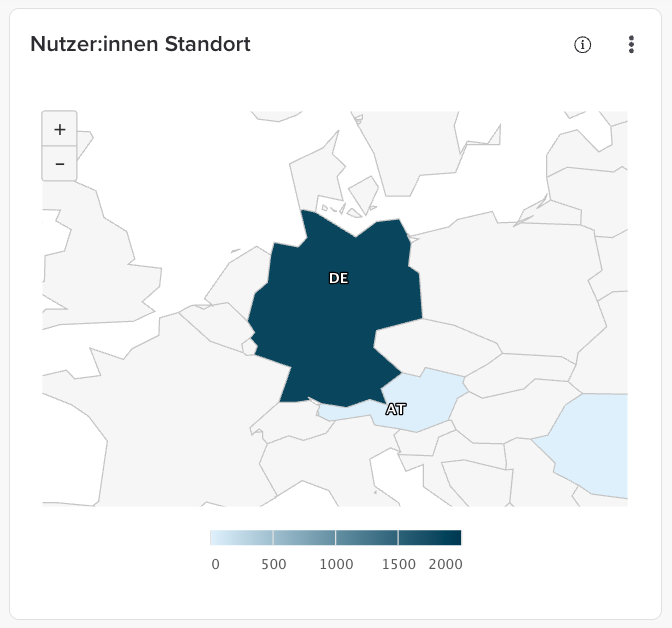
New visual map view
You can now see at a glance which countries your visitors are coming from – presented clearly and visually:
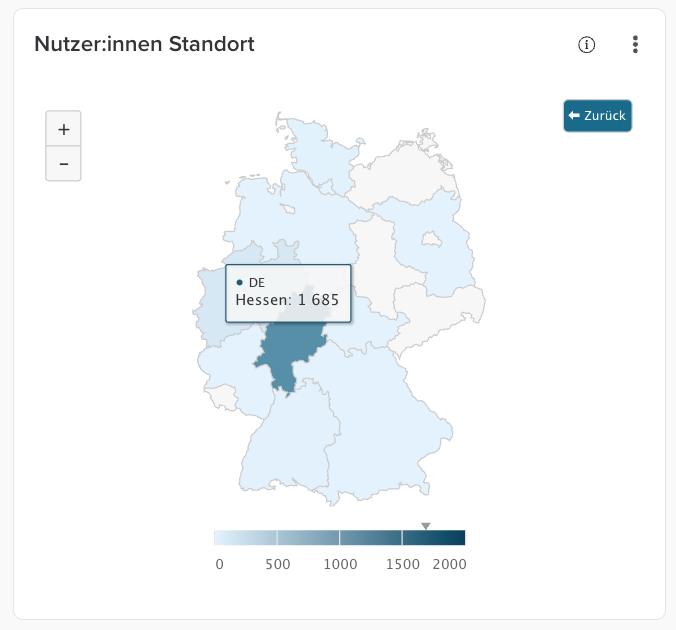
Clicking on a country opens the detail view, where you can see exactly where your applicants are coming from:
FAQ
What data can I see in the Page Performance tab?
→ Page visits, applications per page, time on page and more (details to follow in the Help Center article).
How up to date is the data?
→ The data is updated daily (no real-time data). This is consistent with the logic used throughout the rest of the talentsconnect Home.
With the Page Performance tab, you get the most out of your pages – and make decisions that truly move your recruiting forward.
Was this article helpful?
That’s Great!
Thank you for your feedback
Sorry! We couldn't be helpful
Thank you for your feedback
Feedback sent
We appreciate your effort and will try to fix the article