Our integrated image editor offers a wide range of features that allow you to customize your images individually. Whether you want to crop, rotate, flip, or adjust the brightness, contrast, saturation, and other image settings, this tool provides you with the necessary tools to perfectly tailor every image to your JobShop.

Crop
Cropping an image allows you to remove unwanted parts and focus on what matters most. With our image editor, you can easily select an area to adjust the image to your liking.
Rotate
Sometimes you need an image in a different orientation. With the rotate function, you can rotate your image in 90-degree steps until it reaches the desired orientation.
Flip
Flipping offers a creative way to transform images. You can flip the image vertically to create interesting effects or simply change the perspective.
Image Quality Adjustments
Our image editor also allows you to adjust the image quality. You can increase brightness, adjust contrast, reduce saturation, and much more. These settings enable you to enhance the visual impact of your images.

Select Focus Point
To let you decide which area of your image should always remain visible — regardless of the applicant's device — there is the focus point. For each image, you can define where it should be anchored within its frame.
Note: Depending on the type of image you are using (e.g. faces of people not centered in the image), it may make sense to adjust the focus point of the image.
To do so, follow these steps:
- Select the image
- Click on "Select focus point"
- Adjust the focus point on the image to your preferences and apply the changes
- Publish the changes
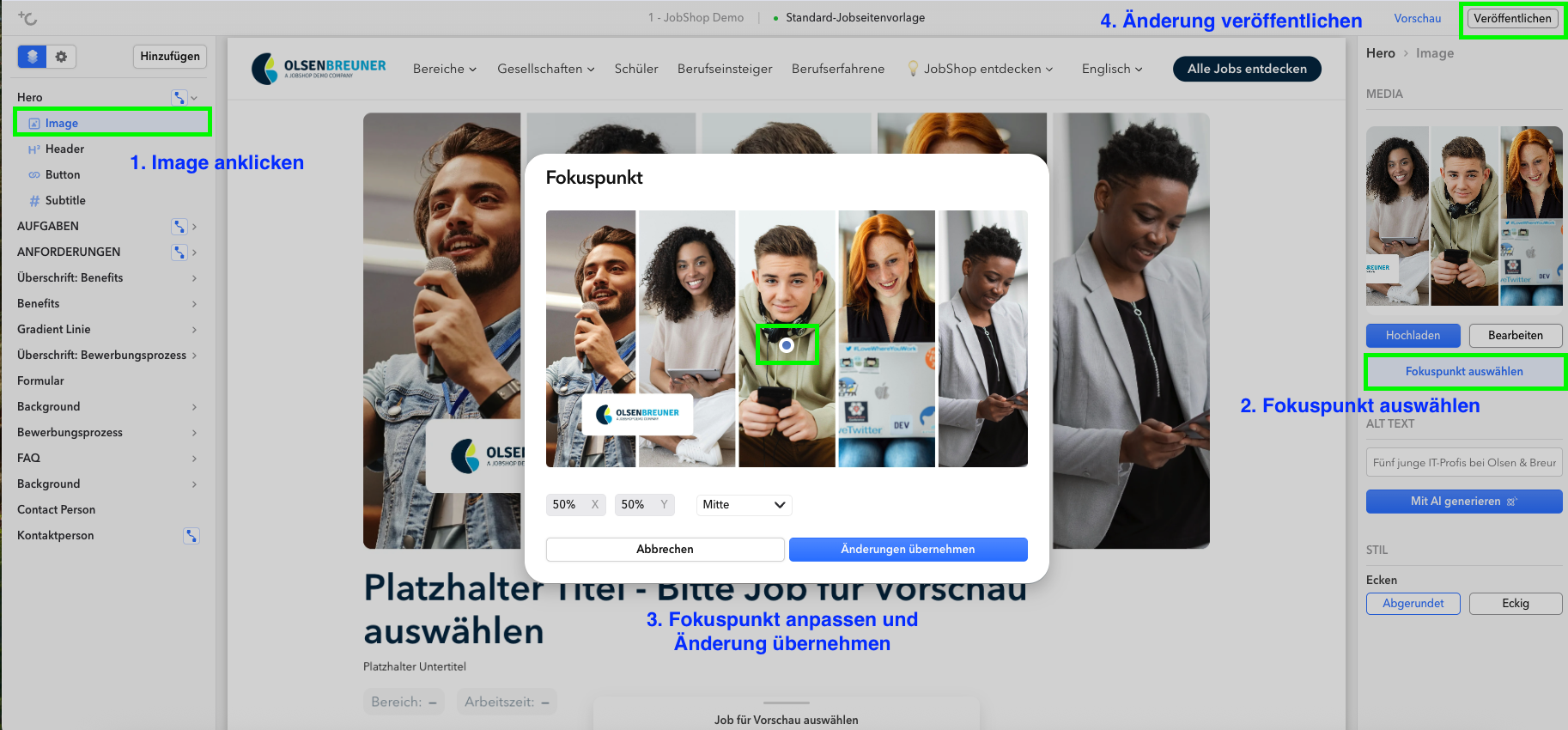
In the selection window, you will see the image preview, the current coordinates (default: 50/50), and a dropdown with predefined positions (e.g. Top Left, Center, Bottom Right). Choose a preset, or click directly on the desired spot in the image.
Was this article helpful?
That’s Great!
Thank you for your feedback
Sorry! We couldn't be helpful
Thank you for your feedback
Feedback sent
We appreciate your effort and will try to fix the article