Goal of This Article
This article shows you how to use the Google Search Console (GSC) to analyze and specifically improve the visibility and performance of your JobShop. You will learn which metrics are relevant, where optimization potential lies, and how to better target your job listings for Google (including Google for Jobs).
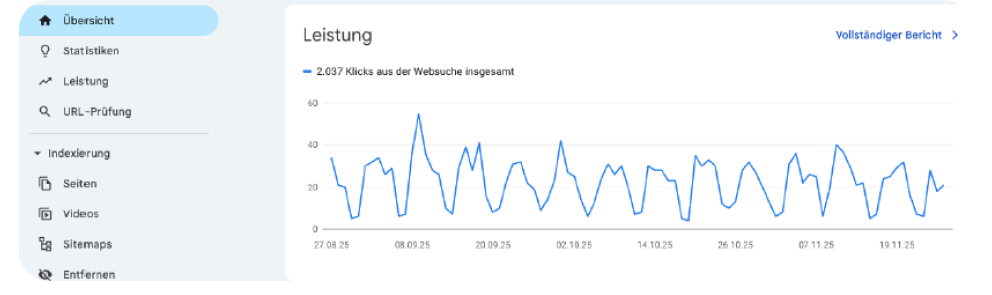
What Is the Google Search Console?
The Google Search Console is a free analytics tool from Google that allows you to understand:
which search queries bring users to your JobShop
how visible your job listings and pages are on Google
which jobs are frequently shown but rarely clicked
This makes it a central tool for SEO-based recruiting and continuous monitoring of your organic visibility.

Step 1: Analyze the Visibility of Your JobShop
How to proceed
Open the section in Google Search Console
Performance → Search queriesSet the search type to "Web" to analyze regular Google search results
Filter by relevant keywords, e.g.:
"Nursing specialist Cologne"
"Sales assistant part-time Berlin"
What to look out for
Many impressions + low click-through rate (CTR)
→ Page is being seen but not clicked → optimization potential in the snippet
High traffic + stable CTR
→ SEO strength, these pages are already performing well
Step 2: Improve Content & Keywords in a Targeted Way
The GSC shows you which search terms lead to which job listings and where your content is visible but not appealing enough.
✔ Analysis Recommendations
Check the average position of individual jobs or pages
→ Position > 10 = barely any visibility on page 1Identify relevant keywords with weak performance
Optimize content and job titles specifically for these terms
⇒ Advanced Measures
Create landing pages for frequently searched combinations, e.g.:
"Jobs in Cologne"
"Nursing jobs Bavaria"
These pages consolidate relevant content and improve ranking chances.
Step 3: Optimize Snippets for More Clicks
A low click-through rate is often not about the ranking, but about the visible search result (snippet).
Best Practices for Snippets:
✔ Meta title clear & search-oriented
Job title
Location
Employment type
✔ Meta description written actively
Benefits, perks, or a call-to-action
✔ Consistent keywords
Keywords must appear in the title, description, and content
Example
✅ "Registered Nurse (m/f/d) in Cologne – Start your career in a modern care team today!"
❌ "Looking for a new professional challenge?"
Google for Jobs: Assessing Performance Correctly
The Google Search Console does not offer a dedicated Google for Jobs dashboard, but you can still draw important conclusions.
How to analyze Google for Jobs visibility:
Examine typical job searches such as:
"Nursery teacher Berlin"
"Mechanic Munich"
Check under Performance → Search results which URLs appear
→ Google for Jobs links directly to job detail pages in the JobShopPay particular attention to:
CTR for specific job titles
Impressions without clicks (indication of unclear titles or missing information)
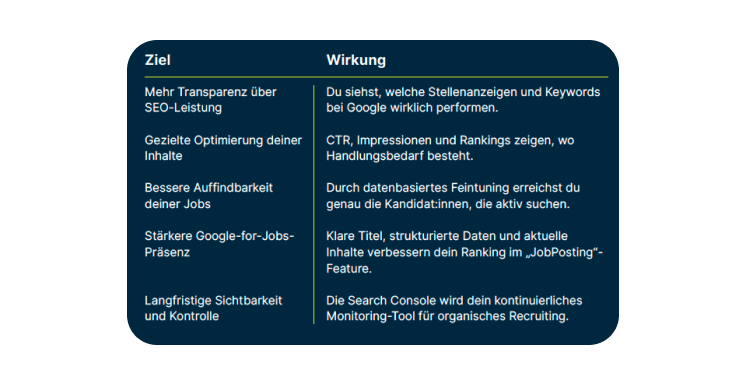
Goals & Effects of Working with the GSC
Conclusion
The Google Search Console is a central tool for data-driven recruiting. It makes the success of your JobShop measurable, highlights clear optimization potential, and helps you improve your organic visibility job by job and page by page.
Used correctly, it supports you in making your online recruiting sustainably more successful.
Checklist: Using Google Search Console Correctly for Your JobShop
✔ Basic Setup & Analysis
☐ Google Search Console is correctly set up for the JobShop
☐ Section Performance → Search queries opened
☐ Search type set to "Web"
☐ Relevant keywords filtered (job title + location)
✔ Evaluate Performance
☐ Pages with high impressions identified
☐ Pages with low click-through rate (CTR) flagged
☐ Pages with high CTR & stable traffic recognized as SEO strengths
☐ Average position reviewed (critical if > position 10)
✔ Optimize Snippets
☐ Meta title contains:
☐ Job title
☐ Location
☐ Employment type
☐ Meta description mentions specific benefits or perks
☐ Keywords are consistently integrated in title, description & content
☐ Unclear or generic titles replaced (e.g. "Looking for a new challenge?")
✔ Improve Content & Keywords
☐ Relevant keywords with weak performance identified
☐ Job titles and texts refined and formulated in a search-oriented way
☐ Content expanded for frequently searched jobs or regions
☐ Targeted landing pages created (e.g. "Jobs in Cologne", "Nursing jobs Bavaria")
✔ Check Google for Jobs Visibility
☐ Typical job searches analyzed (e.g. "Nursery teacher Berlin")
☐ Checked which job detail pages are being shown
☐ CTR evaluated for specific job titles
☐ In case of low CTR, checked:
☐ Is the job title clear?
☐ Is the location clear?
☐ Is the employment type missing?
✔ Continuous Monitoring
☐ Regular analysis scheduled (e.g. monthly)
☐ Optimizations prioritized based on: many impressions + low CTR
☐ Changes in CTR & position reviewed after optimization
☐ Google Search Console established as a permanent SEO monitoring tool
Was this article helpful?
That’s Great!
Thank you for your feedback
Sorry! We couldn't be helpful
Thank you for your feedback
Feedback sent
We appreciate your effort and will try to fix the article